


Weather Live - Forecast&Alert
3.9181.00 Reviews
App Specs
- Version
- 1.6.35
- Updated On
- License
- Free
- Downloads
- 500,000+
- Developer
- DailyBetter Labs
- Categories
- Weather
- Platform
- Android
Screenshots
 Analysis by AppCompare
I like a weather app best when it helps me make a decision quickly, then gives me enough detail to check whether that decision still makes sense. Weather Live - Forecast&Alert aims to do both, pairing a glanceable current-conditions view with forecasts and alerts. In my experience, that makes it useful for everyday planning, though I would treat it as a practical guide rather than the only source I rely on when conditions could become dangerous.
Quick checks for plans that can change
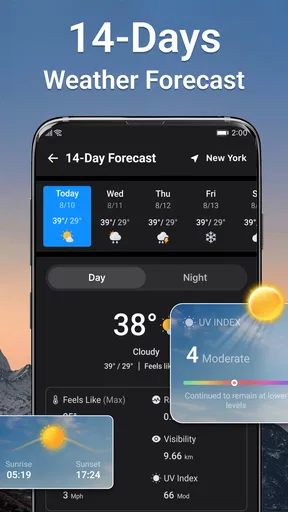
The real value of a forecast app often shows up in small choices: whether to carry a jacket, walk instead of drive, or shift an errand to later. A 24-hour view can help with those near-term decisions, while a longer outlook gives a rough sense of what the coming days may bring. I find that split more useful than a single current-temperature reading, especially when a day starts cool and warms up later.
For example, if I’m deciding whether to leave laundry outside or take a long walk, I would check the hourly outlook before committing. If the forecast changes later, an alert may prompt me to look again rather than assume the morning conditions will hold. That is a sensible workflow for ordinary plans, but I would still check the latest local warnings before heading into severe weather.
What to check before trusting an alert
An alert is most useful when I understand what action it should change. A notification can be a nudge to open the forecast and reconsider a route, an outdoor appointment, or the timing of a trip; it is not a substitute for local emergency guidance. If I’m travelling across a wide area, I would check each destination rather than assume conditions at my starting point apply along the whole route.
There is also a practical trade-off with notifications: frequent prompts can become easy to ignore, while limiting them too much may mean missing a useful warning. I would keep the alerts that matter to my routine and review the app when plans are weather-sensitive. That approach keeps a weather tool helpful without letting every notification interrupt the day.
On the broader app landscape, many phones already include a basic forecast, which is often enough for checking today’s temperature or deciding what to wear. A dedicated weather app makes more sense when I want a focused forecast-and-alert experience in one place. I would compare forecasts during uncertain conditions rather than assume any single app is always right; location, timing, and changing weather can all affect what a forecast is useful for.
There are a few questions I would consider before making it my regular choice. Is the longer outlook detailed enough for the kind of planning I do? Do the alerts arrive at a useful level of urgency rather than creating noise? Does the information for my usual locations make it easy to act? Those are personal fit questions, so I would try the app during a normal week and judge it by whether it changes decisions for the better.
Worth Reading Before You Choose

EA SPORTS FC Mobile 26 Is a Bigger Football Game, but It Takes Time

Flipboard Shows What News Apps Must Do Beyond the Feed

Switching to Android Auto Means Rethinking Your Driving Routine

Google Calendar Makes a Crowded Week Easier to Manage

Ludo King Makes the Most of the Minutes Between Plans

Baby Panda World Brings Quick Play to Modern Phones, but Its Game Library Feels Busy
It is also worth keeping expectations realistic about precision. A forecast is an estimate, not a promise, and a longer-range view is better for spotting broad patterns than fixing an exact outdoor plan far ahead. For a picnic, game, or other event that depends on the weather, I would check again closer to the day and have a backup plan. That small habit matters more than chasing a single definitive forecast.
First Impressions: Clean and User-Friendly
Right off the bat, the app greets you with a sleek interface that’s super easy to navigate. No clutter, no unnecessary distractions—just a straightforward design that focuses on what really matters: the weather. It’s like having a meteorologist in your pocket, without all the technical jargon.
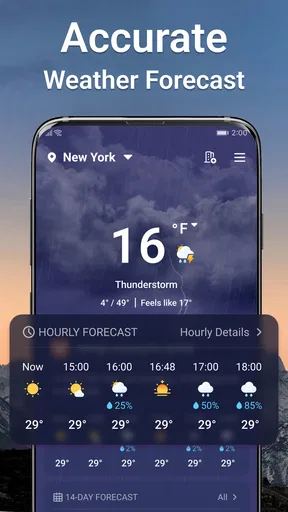
Once you open the app, you’re presented with the current weather conditions, including temperature, wind speed, and humidity. And if you’re like me, always curious about what’s coming up, the detailed hourly and weekly forecasts are just a swipe away. It’s all laid out in a way that makes checking the weather almost enjoyable!
Features That Stand Out
Weather Live - Forecast&Alert isn’t just about telling you if it’s going to rain or shine. It offers a plethora of features that make it a cut above the rest. Here are a few that caught my eye:
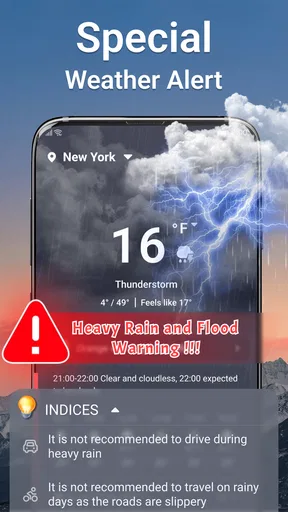
- Real-Time Alerts: Never get caught in a storm again! The app sends you timely alerts for any severe weather conditions, keeping you prepared no matter where you are.
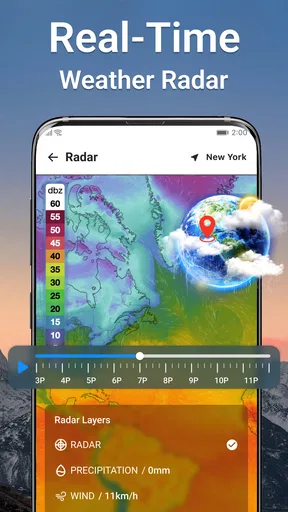
- Live Weather Radar: This feature is a game-changer. It gives you a real-time view of precipitation, so you can track storms and other weather patterns right from your phone.
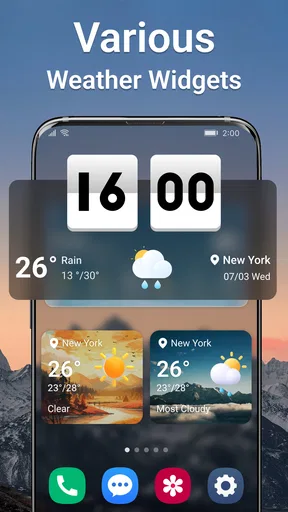
- Customizable Widgets: Want to keep an eye on the weather without opening the app? The customizable widgets let you do just that, displaying the information you care about right on your home screen.
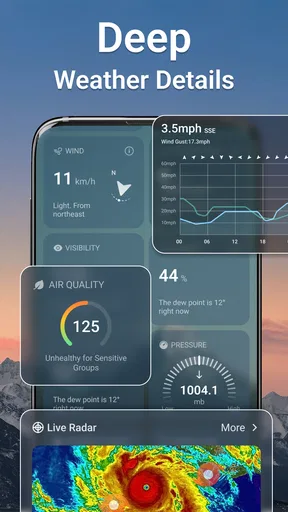
- Detailed Weather Reports: From sunrise and sunset times to UV index and air quality reports, this app covers all bases. It’s perfect for anyone who likes to have a comprehensive overview of their daily weather.
Performance and Usability
I’ve used a fair share of weather apps, and I have to say, the performance of this one is top-notch. The app loads quickly, and I haven’t experienced any crashes or glitches. It’s smooth sailing all the way, even when navigating through its various features.
Another thing I appreciate is the app’s customization options. You can tweak the settings to suit your preferences, whether it’s changing the temperature units or choosing which notifications to receive. It feels very personal and tailored to the user’s needs.
Who will get the most from it
This is a good fit for someone who checks the weather in short bursts throughout the day and wants more than a bare-bones temperature tile. The app is free to download, has an Everyone content rating, and is developed by DailyBetter Labs. It has an average rating of 4.2 from 569 ratings, with 100K+ installs, so it has found an audience without being an obscure experiment.
I’d especially consider it if I regularly walk, commute, run errands, or plan casual outdoor activities and want the forecast and alerts close at hand. It is less compelling for someone who only needs a quick glance once in the morning, since a built-in phone weather panel may already do that job. Likewise, anyone who needs specialist forecasting for professional, aviation, or other high-stakes decisions should use a service designed for that purpose rather than treating a general weather app as an authority.
Cost, version, and a sensible trial
The app is free, but it includes in-app purchases priced from $1.99 to $9.99 per item. I would start with the free experience and decide whether any paid option solves a real problem for me before spending. The presence of purchases does not mean every useful forecast or alert requires payment, so I would check the current options in the app instead of assuming an upgrade is necessary.
It was released on February 7, 2025, and its current version is 1.6.02. The minimum operating-system requirement is 7.0. Those details are useful when checking compatibility, particularly on an older device; if the app installs and runs properly, I would still judge it by how well it handles my locations and daily routine rather than by version number alone.
For a low-effort trial, I’d set up the place I care about most, choose a temperature unit I can read at a glance, and use the forecast for a few ordinary decisions. Then I’d note whether the hourly changes and alerts actually help me adjust plans. That is a better test than opening every feature once: the app earns a place on my home screen only if it saves time or prevents a predictable inconvenience.
Ending Thoughts: Is It Worth the Download?
So, is Weather Live - Forecast&Alert worth checking out? Absolutely! It’s a reliable and feature-rich weather app that’s perfect for anyone who wants to stay informed about the weather without any hassle. It’s especially great for those who need to plan their days around the weather, like outdoor enthusiasts or frequent travelers.
Overall, this app has earned its spot on my phone, and I have no doubt it will on yours too. So why not give it a whirl? You might just find yourself wondering how you ever got by without it!
Pros
- Accurate real-time updates.
- Customizable weather widgets.
- Detailed hourly forecasts.
- Global coverage with local insights.
- Severe weather alerts.
Cons
- Contains in-app advertisements.
- Some features require premium.
- Occasional location inaccuracies.
- Battery consumption can be high.
- Requires internet for full features.
FAQs for Weather Live - Forecast&Alert
What features does Weather Live - Forecast&Alert offer?
Weather Live - Forecast&Alert provides real-time weather updates, detailed forecasts, and severe weather alerts. The app includes features like temperature displays, precipitation forecasts, wind speed and direction, and sunrise/sunset times. It also offers customizable widgets and radar maps to keep users informed about weather conditions in their area.
How accurate is the weather data in Weather Live - Forecast&Alert?
Weather Live - Forecast&Alert uses data from multiple reputable sources to ensure high accuracy in its forecasts. The app frequently updates its information to provide users with the most current weather conditions and predictions. However, as with any weather app, local conditions can vary and should be taken into account.
Is Weather Live - Forecast&Alert free to use?
Weather Live - Forecast&Alert offers both free and premium versions. The free version provides basic weather information, while the premium version includes additional features such as ad-free usage, advanced widgets, and more detailed forecasts. Users can choose the version that best fits their needs.
Can I receive severe weather alerts through Weather Live - Forecast&Alert?
Yes, Weather Live - Forecast&Alert provides notifications for severe weather conditions such as storms, heavy rainfall, and extreme temperatures. Users can customize alert settings to receive timely warnings, helping them stay prepared and safe during adverse weather events.
Does Weather Live - Forecast&Alert require an internet connection?
While Weather Live - Forecast&Alert can display previously downloaded information offline, it requires an internet connection for real-time updates and accurate forecasts. To ensure you receive the latest weather alerts and data, it’s recommended to have a stable internet connection when using the app.


